Technology Consulting Service
Microsoft 365
Empower your Modern Flexi Workforce with Microsoft 365 Business Premium
With the rise of remote working, it is more crucial than ever to provide tools that facilitate work, are intuitive and digitally enabled. Microsoft 365 business productivity cloud (namely Business Premium and Enterprise Plans - E3 / E5 / E7) brings together best-in-class Microsoft office applications with powerful cloud services, device management, advanced security and cyberthreat protection, Gen AI capabilities with Microsoft Copilot, and more.
Based on unique client requirements, we are able to propose and configure different Microsoft 365 implementation scenarios. As certified Microsoft Technology Consultants, we provide holistic digitalisation advisory and have the end-to-end expertise to ensure a successful roll out, adoption, and optimal Microsoft suite integration every time. RSM Stone Forest IT is a certified Microsoft Solutions Partner for Modern Work.

- Zero Setup Fee
- Copilot Grant
- Microsoft E7 - The Frontier Suite
Get a 3-year M365 plan & receive Professional Implmentation at NO COST
Going beyond just license optimisation, RSM delivers maximum value, security and productivity from Day 1:
- Seamless remote migration
- Prevent costly misconfigurations
- Robust security, data protection, and compliance controls
T&Cs apply.
Business Premium & Copilot - 50% Grant Available!
To encourage SMEs to embark on their AI journey, eligible SMEs enjoy 50% subsidised rates (up to 50 licenses/SME). This programme is jointly developed by Microsoft, EnterpriseSG and AI Singapore (AISG). The programme sign-up period is till 30 September 2025. T&Cs apply.
The Complete Platform for AI-Powered Work.
Microsoft E7 brings AI-powered productivity together with enterprise-grade security, so you can work smarter with greater confidence and scale AI responsibly.
- Enable teams and maximise productivity with Copilot
- Secure your data and applications with enterprise security and Entra Suite
- Govern and manage all your AI agents with Agent 365
- Reason, decide and act with the full context of your business with Work IQ including Fabric IQ
Microsoft 365 Business Premium transforms the way you work
Business-class Emails
Professionally send email with a custom domain and access email, contacts and shared calendars with Outlook/ Exchange
Effortless Collaboration
Microsoft Teams offers a central platform to chat, meet, call and collaborate - access meeting notes and shared Office app documents - anywhere, anytime
Secure Virtual Meetings
Securely manage and host online 1:1 meetings, group sessions, or live events for up to 10,000 people with Microsoft Teams
Collaboration and Data Sharing
Easily share and store files while complying with security requirements with SharePoint Online and OneDrive for Business.
Dynamics 365 Integration
Bring efficiencies to sales, operations and finance teams with a seamless lead-to-cash process. Learn more about Dynamics 365 Sales and Business Central
Cybersecurity & Governance
Security protection against emerging threats with Advanced Threat Protection (ATP) solutions, multifactor authentication, mobile device management, security analytics, and more
M365 Data Protection
Safeguard confidential data and ensure PDPA/GDPR compliance with security configurations, encryption, access restrictions and reporting
Custom Apps and Workflows
PowerApps and Flow allow process improvements with the quick creation and deployment of custom applications and automated business processes
Microsoft Copilot
Unleash creativity, unlock productivity, level up skills and enable informed decision making, Copilot will become an indispensable Generative AI tool in the modern workplace
Need expert advice & help in managing your Microsoft 365?
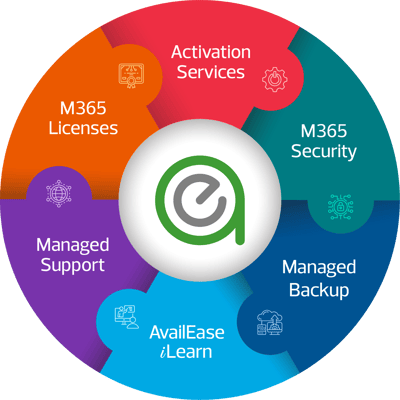
- Enjoy end-to-end Microsoft 365 advisory and management by a team of experts
- Protect your critical Microsoft 365 data with backup beyond the default 30 days
- Continuous and robust Microsoft security configuration and device management
- Hassle-free daily data backup management and swift restoration
- Reliable technical support and M365 advisory to maximise your Microsoft investments

Not sure which Microsoft 365 plan to take for your business?
Microsoft 365 offers a range of plans to suit different business sizes, productivity requirements, security needs and AI ambitions. The right plan depends on how your teams work, the level of protection your business requires, and whether you plan to adopt AI at scale.
-
Microsoft 365 Business Basic
- Features: Web and mobile versions of Word, Excel and PowerPoint, business email, Teams (where included), OneDrive, SharePoint and cloud collaboration tools.
- Best For: Small businesses that primarily work online and need essential productivity, email and collaboration services.
-
Microsoft 365 Business Standard
- Features: Everything in Business Basic, plus desktop versions of Word, Excel, PowerPoint and other Office apps, alongside business email and collaboration services.
- Best For: Businesses that need full desktop Office applications and integrated cloud-based collaboration.
-
Microsoft 365 Business Premium
- Features: Everything in Business Standard, plus enhanced security and device management capabilities, including Microsoft Intune, Microsoft Defender for Business and Microsoft Entra ID features.
- Best For: Growing businesses that need stronger protection for users, devices and business data, particularly those supporting hybrid work or managing multiple devices.
-
Microsoft 365 Apps for Business
- Features: Desktop Office applications and OneDrive cloud storage, without the full suite of business services such as Exchange business email and SharePoint.
- Best For: Businesses that need Office applications and cloud file storage but already use other email and collaboration solutions.
-
Microsoft 365 Enterprise Plans (E1, E3, E5)
-
-
Features: These plans offer more advanced tools and features, such as full enterprise-grade security, compliance, analytics, and support. They include everything from Microsoft 365 Business Premium, but with added enterprise-level options.
-
- E1: Web-based apps, Teams, OneDrive, Exchange, and SharePoint for organisations that primarily work online.
- E3: Adds full Office desktop apps, broader enterprise security, information protection and compliance capabilities.
- E5: Includes everything in E3, plus advanced security, threat protection, analytics, and more robust compliance capabilities.
-
- Best For: Larger organisations or businesses with complex IT environments, stricter regulatory requirements, and more extensive security, compliance, and governance needs.
-
6. Microsoft 365 E7 - The Frontier Suite
-
-
Features: Combines Microsoft 365 E5, Microsoft 365 Copilot, Agent 365 and Microsoft Entra Suite, supported by advanced security, identity, device management and data governance capabilities.
- Best For: Enterprises looking to scale AI adoption across the organisation while maintaining strong security, oversight and governance.
-
How should you decide?
The best choice is not necessarily the plan with the most features. Consider your business size, existing IT environment, security and compliance obligations, and AI roadmap before selecting a licence. You should also review the exact services included, Teams availability and any additional licences required.
For businesses planning to adopt AI, it is particularly important to ensure that identity, access, data protection and governance controls are in place before scaling AI tools and agents. Contact RSM for a quick M365 consult.
Looking to support secure and remote work and collaboration? Here are Microsoft 365 Plans with Security Features Embedded
Microsoft 365 offers business and enterprise plans with different levels of security to help protect company data, manage devices and support secure remote work. The right plan depends on your organisation's size, security requirements, regulatory obligations and whether you are planning to scale AI adoption.
Here is how the key plans compare.
1. Microsoft 365 Business Premium
Security for Growing Businesses - Helps protect company data across business-owned and personal devices, manage access to business applications and reduce exposure to phishing and other cyber threats.
Security Features: Microsoft Defender for Business for endpoint protection against threats such as ransomware and malware; Microsoft Defender for Office 365 Plan 1 for enhanced email and collaboration protection; Microsoft Intune for device and app management; and Microsoft Entra ID P1 for identity and access management, including Conditional Access.
Best For: Small and growing businesses that require a secure hybrid and remote work environment with integrated productivity, device management and stronger security for hybrid and remote work.
2. Microsoft 365 Enterprise E3
Security for Growing Businesses - Helps protect company data across business-owned and personal devices, manage access to business applications and reduce exposure to phishing and other cyber threats.
Security Features: Microsoft Defender for Business for endpoint protection against threats such as ransomware and malware; Microsoft Defender for Office 365 Plan 1 for enhanced email and collaboration protection; Microsoft Intune for device and app management; and Microsoft Entra ID P1 for identity and access management, including Conditional Access.
Best For: Small and growing businesses that require a secure hybrid and remote work environment with integrated productivity, device management and stronger security for hybrid and remote work.
3. Microsoft 365 Enterprise E3
Enterprise Productivity and Security - Helps larger organisations establish consistent security policies, protect business information and manage productivity across a distributed workforce.
Security Features: Enterprise identity and access controls through Microsoft Entra ID P1, core data protection and compliance capabilities through Microsoft Purview, and endpoint and email protection features. Microsoft 365 E3 also includes Defender for Office 365 Plan 1 under the licensing effective from July 2026.
Best For: Organisations that need enterprise productivity, baseline security and compliance capabilities, with additional security services where required.
4. Microsoft 365 Enterprise E5
Advanced Enterprise Security and Compliance - Strengthens threat detection and response, provides greater visibility into security incidents, and supports more demanding data protection, investigation and compliance requirements.
Security Features: Builds on E3 with more advanced capabilities, including Microsoft Defender XDR, Defender for Endpoint Plan 2, Defender for Office 365 Plan 2, Microsoft Entra ID P2 and advanced Microsoft Purview compliance features.
Best For: Large enterprises or organisations with complex IT environments, higher security risks or more demanding regulatory and compliance needs.
5. Microsoft 365 E7
Integrated AI, Security and Governance - Helps organisations bring AI into everyday work while strengthening identity and access controls, protecting business information and improving visibility over AI agents. This supports businesses looking to scale AI-powered workflows with greater oversight and control.
Security & AI Features: Combines Microsoft 365 E5, Microsoft 365 Copilot, Microsoft Entra Suite and Microsoft Agent 365. It extends enterprise security and identity capabilities to support AI adoption, including the management and governance of AI agents.
Best For: Enterprises looking to combine advanced productivity, security and compliance with organisation-wide AI adoption and AI agent governance.
6. Microsoft 365 Business Standard
Limited security and protection – Supports everyday email, file sharing and online collaboration, with baseline protections for business information.
Security Features: Includes built-in security for cloud services, such as Exchange Online Protection for email, alongside data encryption and sharing controls in Microsoft 365 services. It does not include the same integrated advanced endpoint security and device management capabilities as Business Premium.
Best For: Small businesses that need productivity and collaboration tools with essential security for remote work, and may require an upgrade for additional security controls as their needs grow.
In Summary
The best Microsoft 365 plan depends on the level of protection and control your business needs:
-
For growing businesses: Business Premium provides an integrated set of productivity, endpoint security, identity and device management capabilities.
-
For larger organisations: Microsoft 365 E3 provides enterprise productivity and baseline security, while E5 offers more advanced threat protection and compliance capabilities.
-
For enterprises scaling AI: Microsoft 365 E7 combines the E5 foundation with Copilot, Entra Suite and Agent 365 to support AI-powered productivity and AI agent governance.
Choosing the right licence is only the starting point. Businesses should also configure security policies, manage user access, protect sensitive data and establish clear governance procedures. For AI adoption, this includes assessing how Copilot and AI agents access business information and what actions they are permitted to perform.

What is Microsoft 365 E7?
Microsoft 365 E7 (often called the Frontier Suite) is Microsoft's integrated enterprise AI, productivity, security and governance offering.
It is designed to help organisations scale AI adoption with enterprise-grade security and control. Microsoft 365 E7 supports a workplace where employees collaborate with AI assistants and AI agents to execute tasks and automate workflows.
E7 bundles four core pillars into a single integrated license instead of separate add-on contracts:
- Microsoft 365 E5: Provides enterprise productivity, security, identity, compliance, analytics capabilities to protect users, applications and data.
- Microsoft 365 Copilot: Integrates AI assistance across everyday productivity apps like Word, Excel, PowerPoint, Outlook and Teams, helping employees analyse information, create content and streamline tasks.
- Microsoft Entra Suite: Advanced identity and access governance across users, applications and AI agents to manage access and reduce identity-related risks.
- Microsoft Agent 365: A central control plane to observe, govern and secure Microsoft and third-party AI agents with visibility into each agent activity and controls to proactively manage AI-related risks. Autonomous bots that trigger multi-step workflows and act on behalf of the business.
What is Work IQ and Fabric IQ?
Microsoft 365 E7 is powered by Work IQ, Microsoft's workplace intelligence capability, which helps ground AI in organisational context. Alongside Microsoft's broader intelligence ecosystem, including Fabric IQ for business data intelligence, these capabilities can help AI systems deliver more relevant insights and support business workflows.
By bringing AI-powered productivity together with identity security, data protection and AI agent governance, Microsoft 365 E7 helps organisations move beyond isolated AI pilots towards more coordinated, enterprise-wide adoption. However, successful implementation still requires suitable data foundations, clear governance policies, defined business use cases and appropriate change management.
For businesses exploring Microsoft 365 E7, the priority is to identify where Copilot and AI agents can deliver measurable business value while ensuring that access, data, security and governance controls are ready to support adoption at scale.
Why Microsoft 365 E7 matters for AI and Data Intelligence? How does it help businesses scale AI securely?
As AI evolves from answering questions and generating content to carrying out tasks and automating workflows, businesses need to know not only what AI can do, but also what information it can access, what actions it can take and how its activities are managed.
Microsoft 365 E7 addresses five key business priorities:
- Turn AI adoption into measurable business value. Microsoft 365 Copilot helps employees create content, analyse information and work more efficiently. AI agents can take this further by supporting multi-step tasks and automating workflows, helping businesses reduce repetitive work and improve productivity.
- Gain visibility and control over AI agents. As more teams adopt AI tools, it can become difficult to track which agents are in use and what they can access. Microsoft Agent 365 provides a central control plane to help organisations discover, monitor, manage and govern Microsoft and third-party AI agents.
- Protect business data and reduce AI-related risks. AI tools and agents may interact with confidential documents, customer information and internal business systems. Microsoft 365 E7 combines identity, security and data protection capabilities to help control access, safeguard sensitive information and manage risks as AI adoption expands.
- Make AI more relevant to your business. Powered by Work IQ, Microsoft's workplace intelligence capability, Microsoft 365 E7 helps ground Copilot and AI agents in organisational context, including work-related information, collaboration and business activity. This can help AI deliver more relevant assistance and support workflows that reflect how your teams work.
- Simplify AI, security and governance management. Microsoft 365 E7 brings together Microsoft 365 E5, Microsoft 365 Copilot, Microsoft Entra Suite and Microsoft Agent 365. For organisations that need these capabilities, an integrated offering can simplify licensing decisions and provide a more coordinated approach to productivity, identity protection and AI governance.
Does Microsoft 365 E7 guarantee secure AI adoption?
No. Microsoft 365 E7 provides integrated security, identity and AI agent governance capabilities to help organisations manage AI-related risks. Businesses still need appropriate access controls, data governance, clear policies, employee training and ongoing monitoring to implement AI responsibly.
Ready to turn AI potential into business impact? Engage our RSM CTOaaS consultants to build the right Microsoft 365 E7 roadmap for your business, improving productivity, streamlining workflows and scaling AI adoption securely and responsibly.
Why business leaders are choosing to outsource Microsoft 365 Management?
Managed Microsoft 365 services offer numerous benefits to businesses by optimizing their use of their Microsoft platform while ensuring security, efficiency, and support. Key advantages include:
-
Expert Support and Guidance: Access to skilled IT professionals who provide ongoing support for troubleshooting, configuration, and training to ensure your team fully leverages Microsoft 365’s features.
-
Proactive Monitoring and Maintenance: Continuous monitoring of Microsoft 365 environments to detect and resolve potential issues before they impact business operations, ensuring minimal downtime and enhanced system performance.
-
Enhanced Security and Compliance: Managed Microsoft 365 services help strengthen security by implementing Microsoft baselines and best practices, such as Multi-Factor Authentication (MFA), data encryption, and compliance management tools, ensuring your organization meets regulatory requirements.
-
Backup and Disaster Recovery: Reliable backup solutions and disaster recovery planning to protect critical business data, preventing data loss and ensuring business continuity in case of emergencies. Protect your critical data against ransomware and accidental deletion. Learn more about our backup solution for Microsoft 365.
-
Scalability and Flexibility: As your business grows, managed services can help scale your Microsoft 365 infrastructure, ensuring that your needs are met without having to manage the complexity internally.
-
Cost Efficiency: Outsourcing the management of Microsoft 365 allows businesses to reduce overhead costs by eliminating the need for in-house specialists while still getting high-level support and expertise. RSM is a certified Microsoft partner for Modern work.
-
Optimized Collaboration and Productivity: With proper configuration and management, Microsoft 365 tools such as Teams, OneDrive, and SharePoint are optimized for seamless collaboration and communication, boosting overall business productivity.
- Stay future-ready: Stay ahead of the curve and meet the evolving needs of consumers and employees by leveraging Microsoft app integration for greater synergies across your backend processes and tap on Copilot advisory to boost productivity, foster creativity, and enhance smarter decision making.
By choosing managed Microsoft 365 services, businesses gain a reliable, secure, and efficient IT infrastructure that supports growth and innovation without the internal management burden. Contact us for a complimentary Microsoft 365 digitalisation advisory to get started.
Our Microsoft Suite of Expertise
Our extensive Microsoft expertise covers the full Microsoft stack: From securing workplace collaboration with Microsoft 365 and Microsoft security, to intelligent business applications like Dynamics 365 Business Central and CRM, to data & analytics with Power BI, to leveraging Gen AI for automation and efficiencies with Copilot, as well as Azure cloud infrastructure expertise.